
How it works
From separate tools to one AI colleague that works alongside you.
In four steps: where things go wrong today, how Cyrill distributes the work, how your team works along, and how everything stays connected to the systems you already have.
How does an AI colleague from Match-AI work?
An AI colleague is an AI agent that works with your team inside your own systems. You ask Cyrill, just as you would ask a colleague. He distributes the work across specialists per department, such as Karel for sales and Frits for finance. You and your colleagues work along in one conversation, with one shared memory.
Step 0 · Today
Every department its own island
Email in Outlook, customers in HubSpot, invoices in Exact, planning in Excel. And meanwhile everyone has their own ChatGPT. Knowledge lives in heads and scattered chats, and nobody sees what’s falling through the cracks.
Step 1 · Coordination
Cyrill distributes the work
You ask Cyrill, just as you would ask a colleague. He breaks the request down into tasks and hands them to the right specialist: Karel for sales, Frits for finance, Henk for planning.
Step 2 · Collaboration
You, your colleagues and your AI colleagues in one conversation
Every job gets its own channel. You see live who is working on what, you steer where needed and you approve before anything goes out the door.
Step 3 · Memory
Learns from your team, works for your team
Your AI colleague learns from every task it does with your colleagues: how you build quotes, which tone a customer likes, which exceptions apply. It then uses that knowledge for everyone.
Explained once, reused by the whole team. The technician reports extra work from his phone, and the back office sees it straight away on the invoice. And the knowledge stays in your company, even when someone leaves.
Step 4 · Integrations
Works in the systems you already have.
A selection of the integrations. In total your AI colleague can work with more than 1,500 systems. You don’t have to replace anything.
 Outlook
 Gmail
Gmail Teams
Teams WhatsApp
 HubSpot
 Exact Online
 Xero
Xero QuickBooks
 Excel
Excel Google Sheets
 Google Calendar
 Syntess
 SharePoint
 Google Drive
 Notion
 Slack
Slack Shopify
 WordPress
 Mailchimp
 LinkedIn
What it looks like
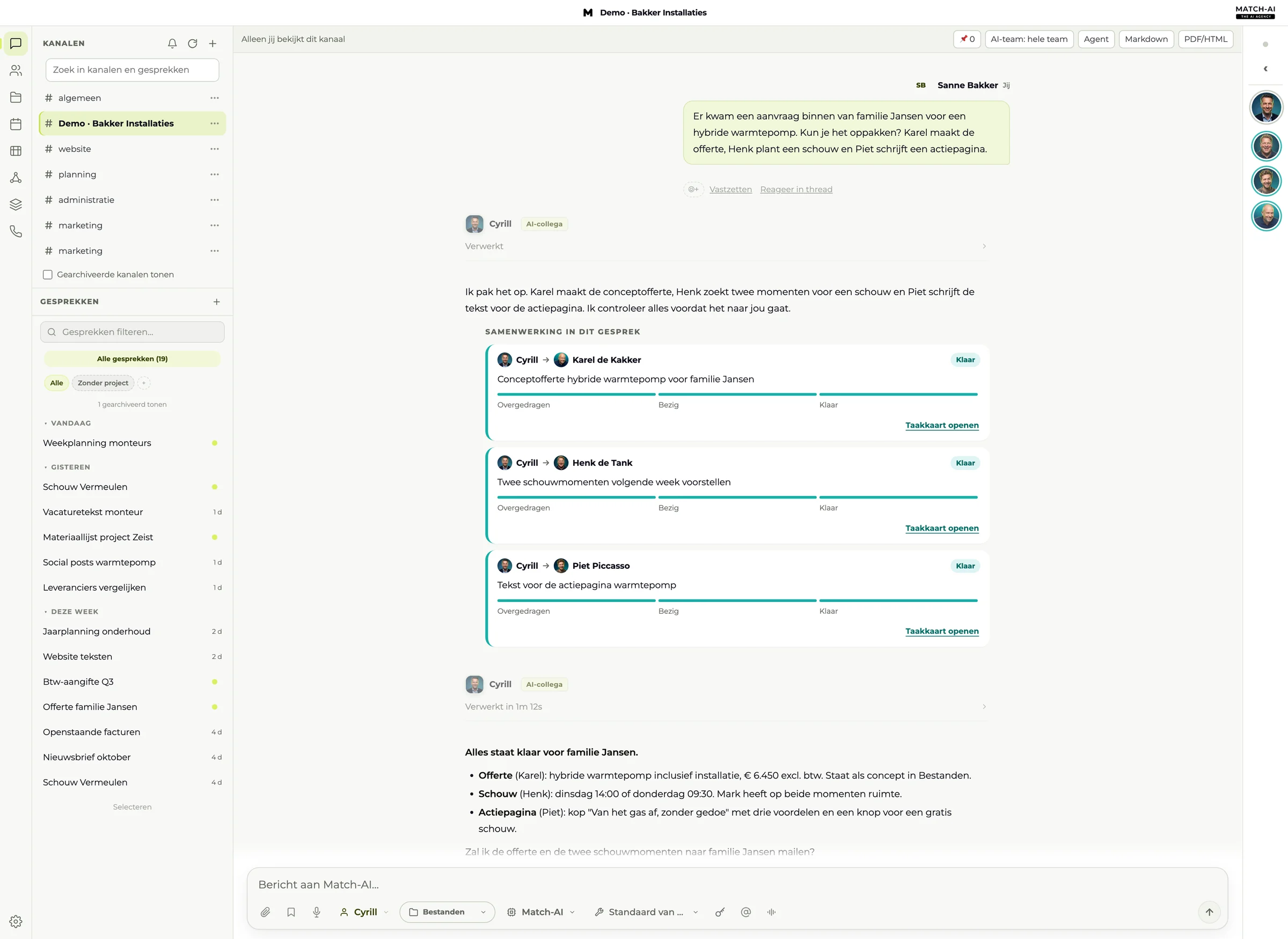
Your workspace
Your channels on the left, the conversation in the middle, who’s working along on the right. No new system to learn: it feels like chatting with your team.
Questions
Frequently asked questions
What does the AI colleague do itself, and what stays with us?+
Who sees what?+
Does it work on my phone too?+

Learns from your whole team. Works for your whole team.





Our team is ready for you.
A 30-minute call with Peter from our team. Together we look at where your team loses time and whether an AI colleague is a good fit.